


Meal Planner
A private meal planner that feeds two people with different calorie and protein targets from the same cooked meals
In short
- Before this, we were mostly guessing what to eat each week, with no one place to keep track of groceries or plan around our budget.
- I built a private meal planner where we cook one meal and it calculates how much each of us should eat based on our individual needs.
- The budget said a week cost $437 when the receipt said $250, so I fixed it to price weighed items by weight instead of by packages nobody sells.
- We still use it regularly. It’s turned into something we actually use instead of just a project I finished and forgot about.

The situation
Before building the app, we were mostly guessing what to eat each week. We tried HelloFresh, used AI to come up with meal ideas, and sometimes just made recipes we already knew.
We didn’t really have one place to organize everything, keep track of groceries, or plan around our budget.
The app is for two people with different calorie and protein targets cooking one set of meals.
It has to work standing at the stove, deciding how much of tonight’s pot is whose.
It has to work in a grocery store, with the list open on a phone.
And it has to work when packing food for a canyoneering day, where everything has to be carried.
The money mattered too. At one point the budget said a week cost $437.16 when the receipt said $250. The one screen about money was the one giving the wrong answer.

A week on a phone
The app on a phone, in the order a week gets planned.

Step 1 of 6
This week look normal?
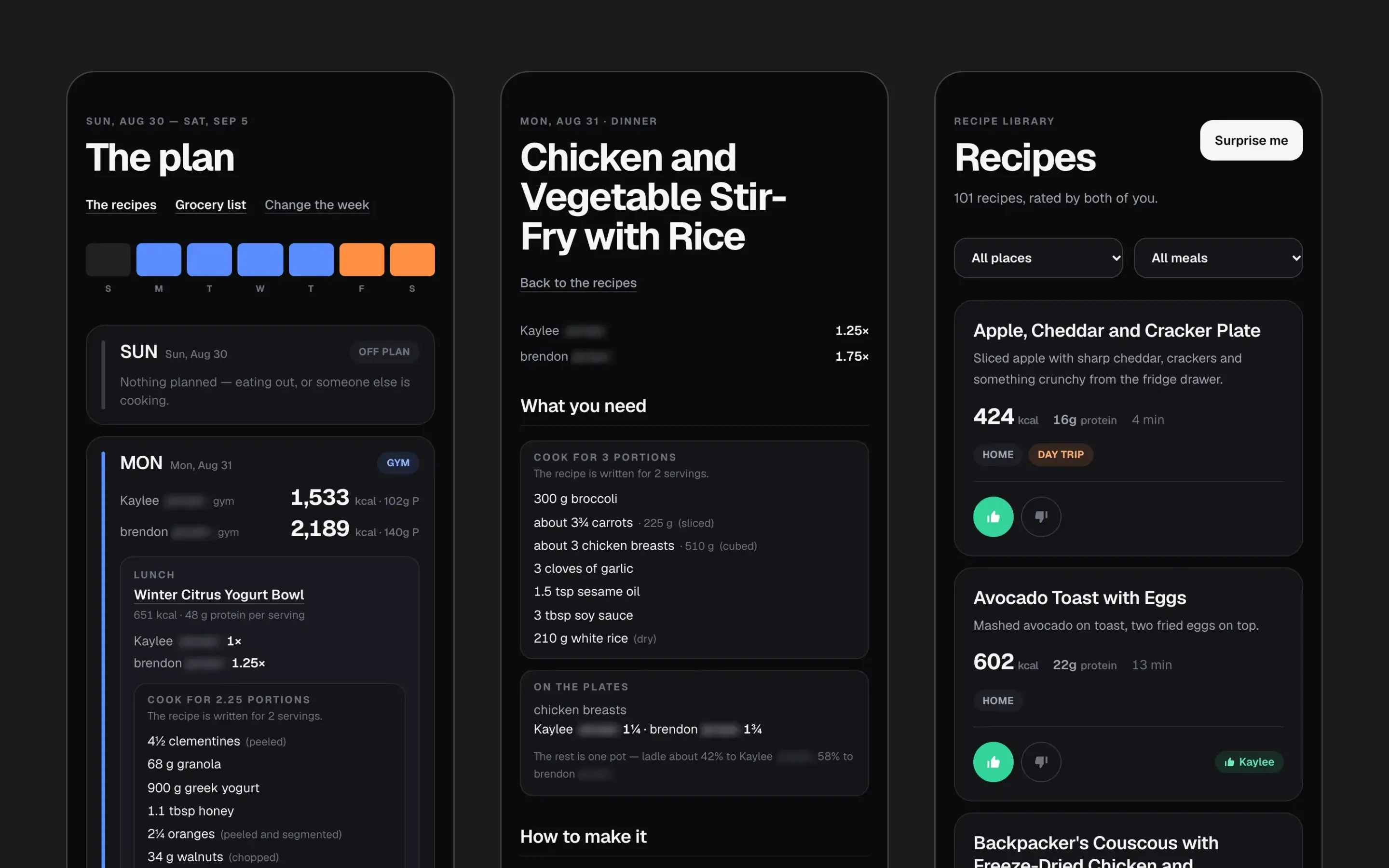
The week opens on the usual one. Each day shows both people’s calories, where they’re eating, the kind of day, and which meals to plan.

Step 2 of 6
The plan
Each day carries both people’s calorie and protein targets. A meal shows each person’s portion, here 1× and 1.25×, and the ingredients scaled to cook 2.25 portions.

Step 3 of 6
The week's recipes
Everything on the plan, day by day. Tapping a meal opens what you need and how to make it.

Step 4 of 6
Monday
One day at a time: lunch, dinner and a snack, then on to Tuesday.

Step 5 of 6
One pot, two portions
Monday’s dinner. The ingredients are scaled to cook 3 portions, and On the plates splits the chicken 1¼ to Kaylee and 1¾ to Brendon.

Step 6 of 6
This week's targets
From the profile: Brendon’s daily calories for the week at a 15% deficit, 3192 on mountain days and 2203 on gym days, with 140 g of protein throughout.
Step 1 of 6
My role
I built it on my own.
I wrote the spec, designed it, and built everything: the planner, the portioning, the grocery list, the cost estimate, the Trail Bin for hiking food, AI recipe generation, and the test suite.
Nothing was in place before me except the services it runs on: Neon, Vercel, Google sign-in, and the Anthropic API.
I had wanted to build my own application for a while, but I knew it was going to be a bigger project than what I had worked on before. I used Claude to help with development, work through technical challenges, and understand things as I was building.
AI was a big part of the development process, but the project came from something I personally wanted to create and use. I was involved in shaping the features, figuring out what worked, and making changes based on how we actually used the app.
One of the biggest things I took away from the project was how much I learned throughout the process. It gave me experience working through a larger application, and it’s something I want to keep improving and building on.
At a glance
17 days
First commit to last
25 August to 10 September 2026.
1,491
Automated tests, all passing
From a Vitest run on 22 October 2026, which includes work after September.
104
Ingredients modeled
36 of them with a recorded piece weight.
Key decisions
Only give an ingredient a piece count when the piece is honest
“2 chicken breasts” is easier to shop for than “425 g”, so every ingredient could have been given a count.
But shrimp, a cabbage head and a rotisserie chicken vary by two or three times per piece.
A count that is not honest reads as precise while being worse than the weight it replaced.
So 36 of the 104 ingredients have a piece weight, and the rest stay in grams.
Every piece weight is pinned in a test, so a new ingredient cannot be added without a decision about its piece.
Split one cooked recipe into two different portions
Kaylee and I eat dinner together, and we’re not going to cook two completely different meals every night. We also wanted to be more intentional about our portions and weight goals.
The idea was to cook one meal but have the app calculate how much each of us should eat based on our individual needs.
The solver might say 425 g of chicken. Nobody shops that way, so the list rounds to what you can actually buy, and the cooking screen splits one pot into two unequal servings.
Google sign-in plus a two-email allowlist
Signing in with Google proves who you are. It does not prove you are allowed in.
I wanted the application to be private so only the two of us could use it. The allowlist is what keeps it that way.
I tested it with another Google account, and it was denied access.
A week already shopped for keeps its old maths
When the over-buying bug was fixed, a saved week with no recorded yield kept the previous arithmetic.
That way a list someone had already shopped from did not silently change underneath them.
Around the app
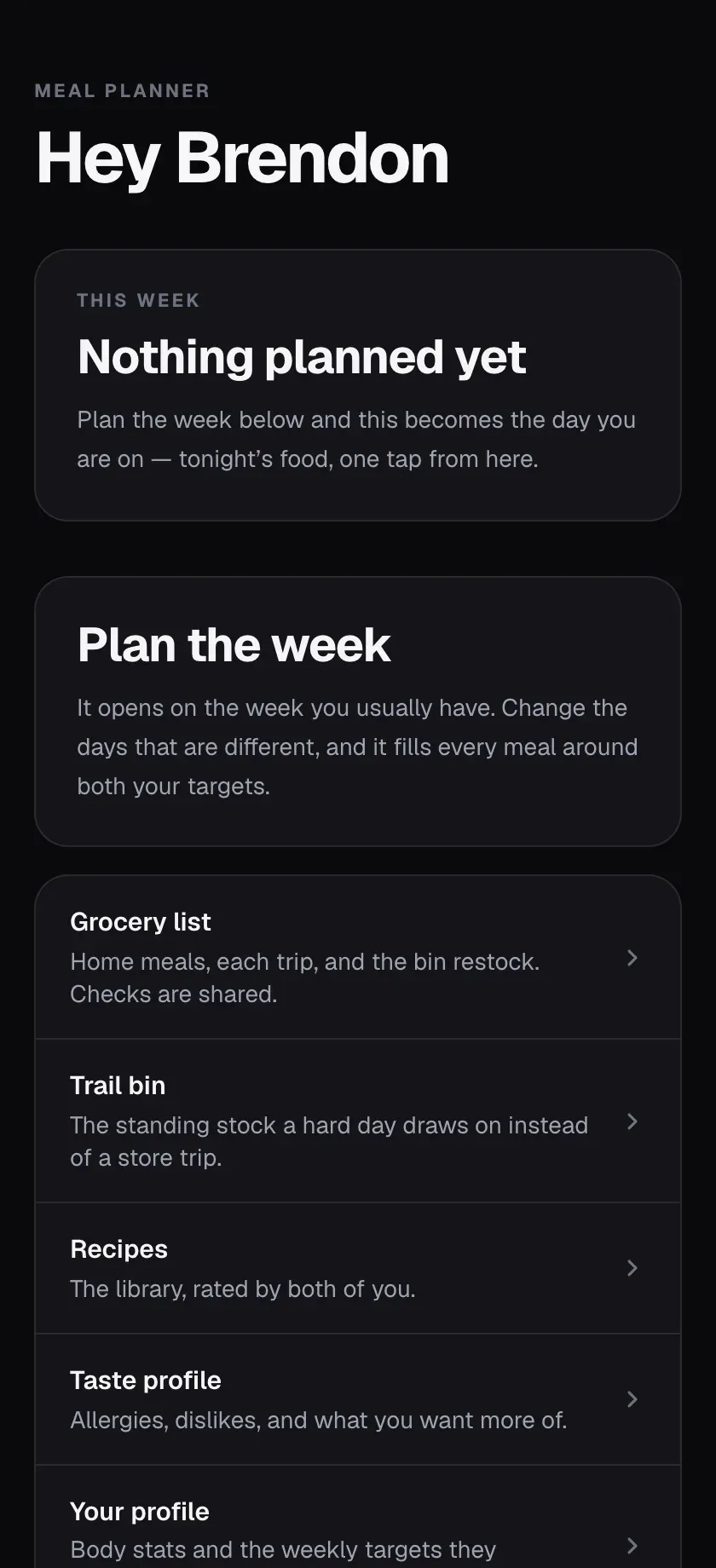
Home, before the week is planned.
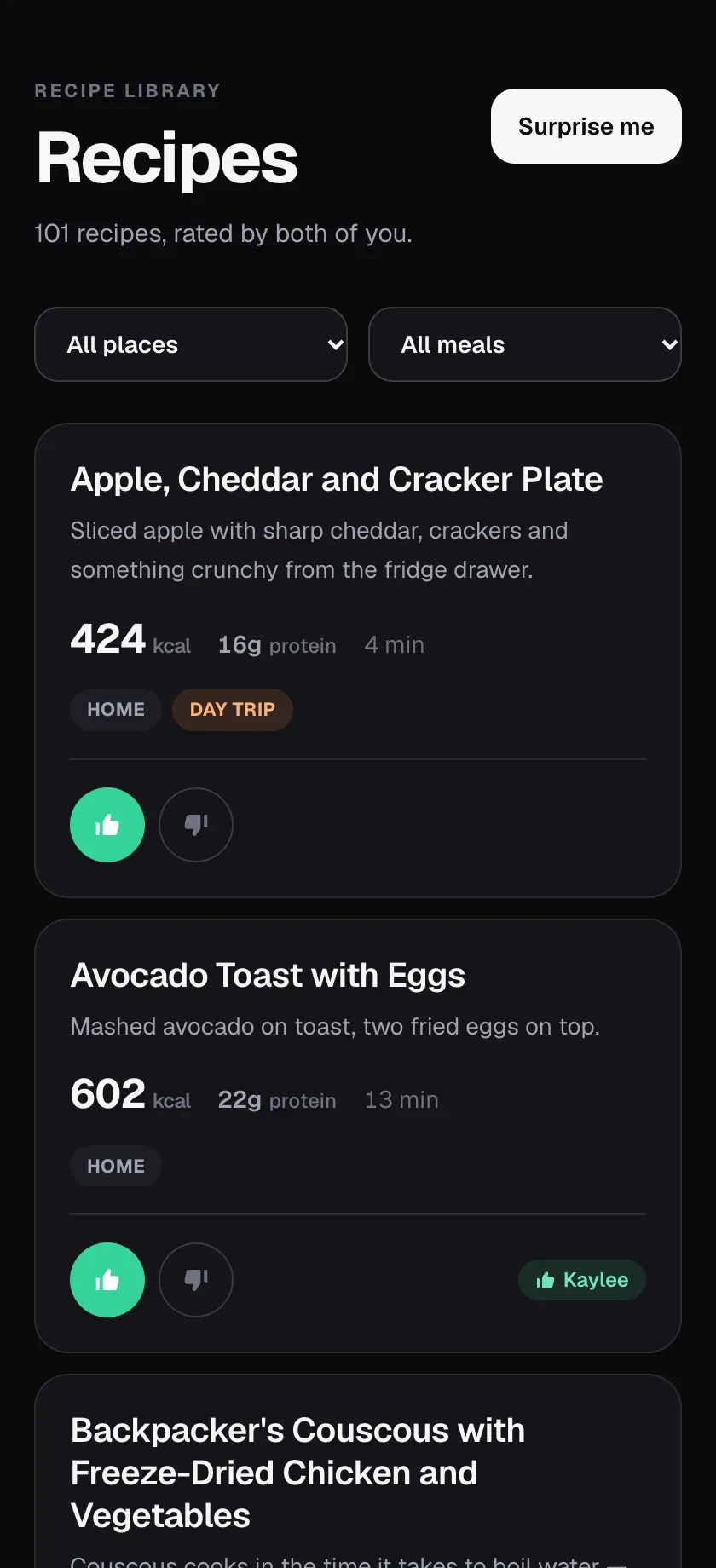
The recipe library, rated by both of us.
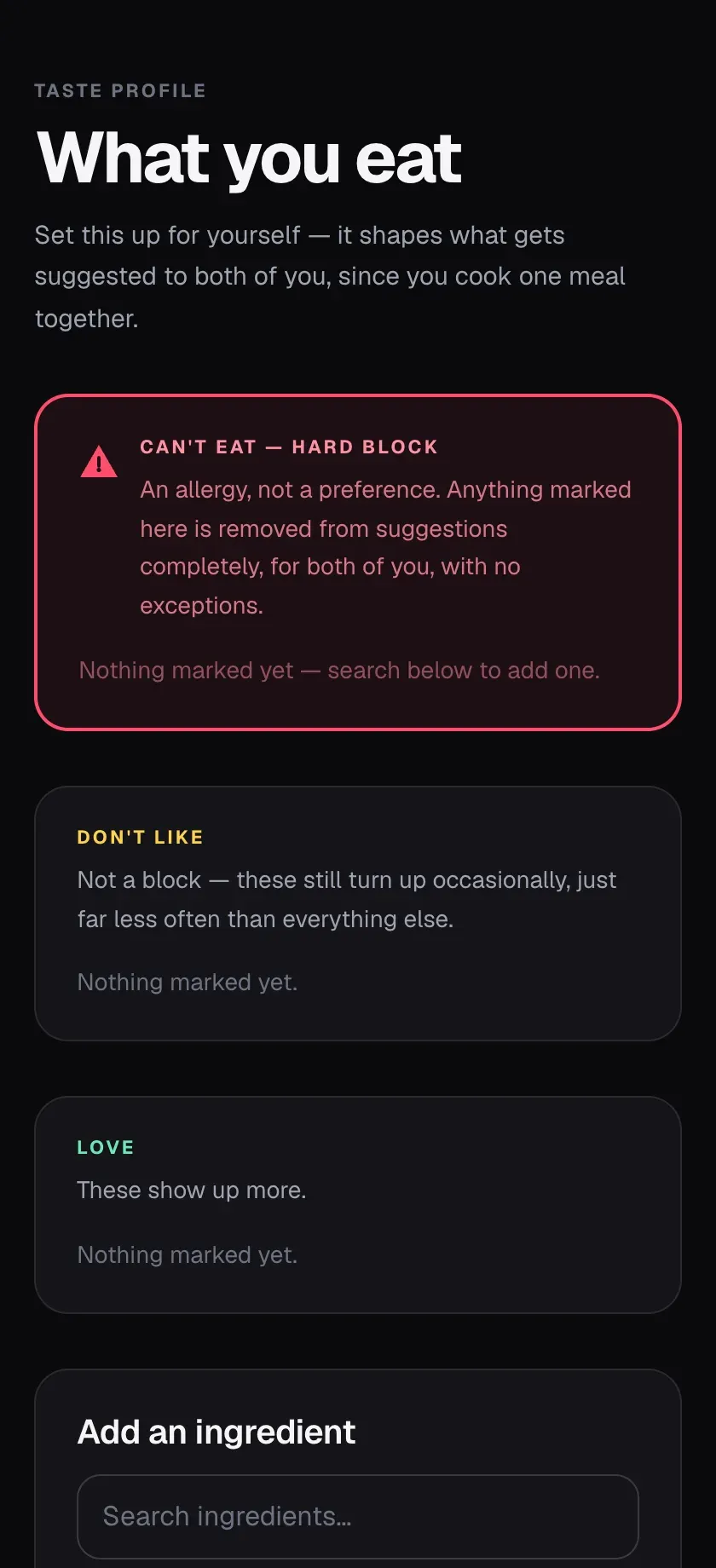
The taste profile. An allergy is a hard block; a dislike only turns up less often.


A budget 75% too high
The grocery budget said $437 for a week that cost $250 at the till, because the app priced every item as whole packages when a meat counter charges for exactly what the scale weighs.
Problem
The weekly cost came out at $437.16 against a real receipt of $250. That is 75% too high, on the only screen about money.
One line showed it clearly: 1,020 g of salmon charged as three 1 lb packs at $36.00.
First assumption
When I saw the budget showing $437 against a $250 grocery receipt, I knew something wasn’t adding up.
It made me realize that just because a feature works doesn’t necessarily mean it’s calculating everything correctly. I needed to look more closely at how the budget was being calculated.
What I found
A scale sets the price at the meat counter, the deli slicer and the produce bin.
The counter weighs out 2.25 lb of salmon for $26.96. Nobody sells half a jar.
The app had one rule for two kinds of item. Eighteen ingredients are sold by weight.
Fix
I worked on correcting the budget calculations so the numbers would better reflect our actual grocery spending.
I added a soldByWeight flag and set it on those 18 ingredients, so they charge the exact share and show the per-pound price instead of naming a package nobody had to buy.
Jars, cartons and sealed bacon still round up, because you really do buy the whole thing.
The waste figure now counts only the rounded lines.
// Calculate the price by weight instead of package size.
// 1020 g of salmon was billed as three 1 lb packs ($36) instead of $26.96.
const usedFraction = needed / record.qty
const packages = record.soldByWeight ? 0 : piecesToBuy(usedFraction)
const cents = record.soldByWeight
  ? Math.max(1, Math.round(price * usedFraction))
: packages * priceHow I verified it
I don’t have a verified before-and-after total for that specific week, so I’d rather explain what I fixed than claim a result I can’t confirm.
The tests are the check. They pin the edge cases: bacon and shrimp are priced per pound but still come sealed, and Swiss cheese is shelf-priced but sliced to order.
Result
We still use it regularly. I originally built it to make meal planning easier for the two of us, and it’s turned into something we actually use instead of just a project I finished and forgot about.
The list now buys each recipe once per batch instead of once per portion.
The budget prices weighed items by weight instead of by packages nobody sells.
What I'd do differently
I would spend more time making sure the grocery budget and meal planning work together correctly from the beginning.
I’d also improve how food groups are organized and make it easier to grab everything we need for the week.
I learned that building features is one thing, but making sure they work together in everyday use is just as important.
Full stack
- Front end
- Next.js 16 (App Router)
- React
- TypeScript
- Tailwind CSS 4
- Zod
- PWA
- Backend and data
- Postgres (Neon)
- Drizzle ORM
- Auth.js v5
- Google sign-in
- Build and deploy
- Vercel
- Vitest
- AI
- Anthropic SDK